Translate PDFs without losing the layout.
PDFTranslate is a browser-based service for translating native and scanned PDFs while preserving page structure. It applies OCR when needed, shows the source-page quote before processing, and returns translated-only plus bilingual PDFs.
- Native + scanned PDFs
- OCR included
- Quote before translation
Upload a PDF → choose the target language → review the page quote → download translated and bilingual PDFs.
Choose from 13 source languages and translate into 19 target languages, adding Indonesian, Vietnamese, Thai, Turkish, Polish, and Dutch.
Translate a PDF
Drop your PDF here
or choose a file · PDF only · up to 50 MB
Current production capabilities
What can PDFTranslate handle today?
These are the limits and outputs exposed by the current production service. They describe what the product supports today, not a promise of perfect translation or pixel-identical layout for every document.
Review the quality methodology and verify the operator through Companies House.
Product information reviewed .
| Capability | Current support |
|---|---|
| PDF input | Native and scanned PDF documents |
| OCR | Included for image-only pages |
| Languages | 13 source languages and 19 target languages |
| File limits | Up to 50 MB and 100 source pages per PDF |
| Outputs | Translated-only and bilingual PDF files |
| Usage quote | Source-page count and required credits shown before processing |
Example 1 of 9
Real translated output
Academic paper
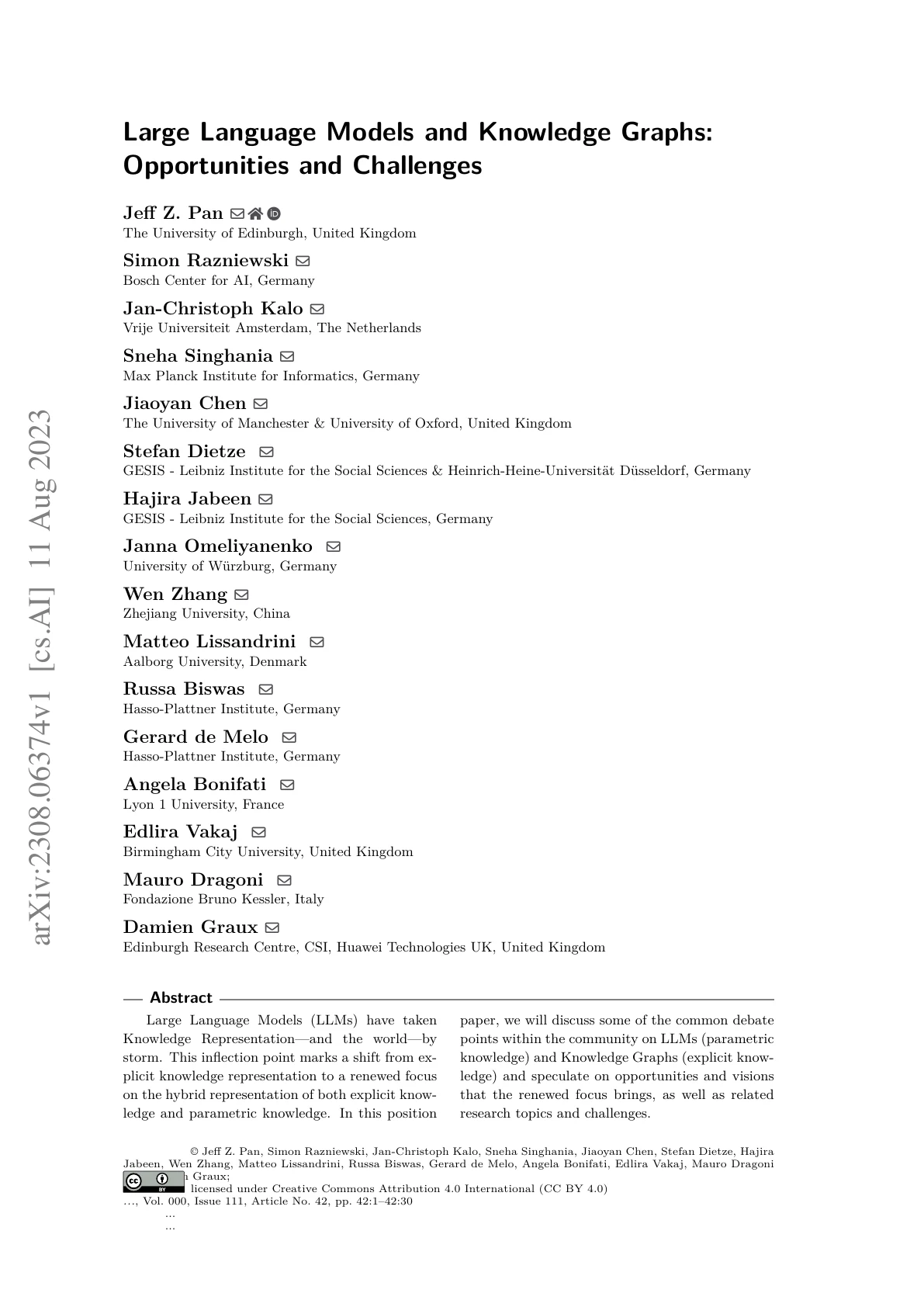
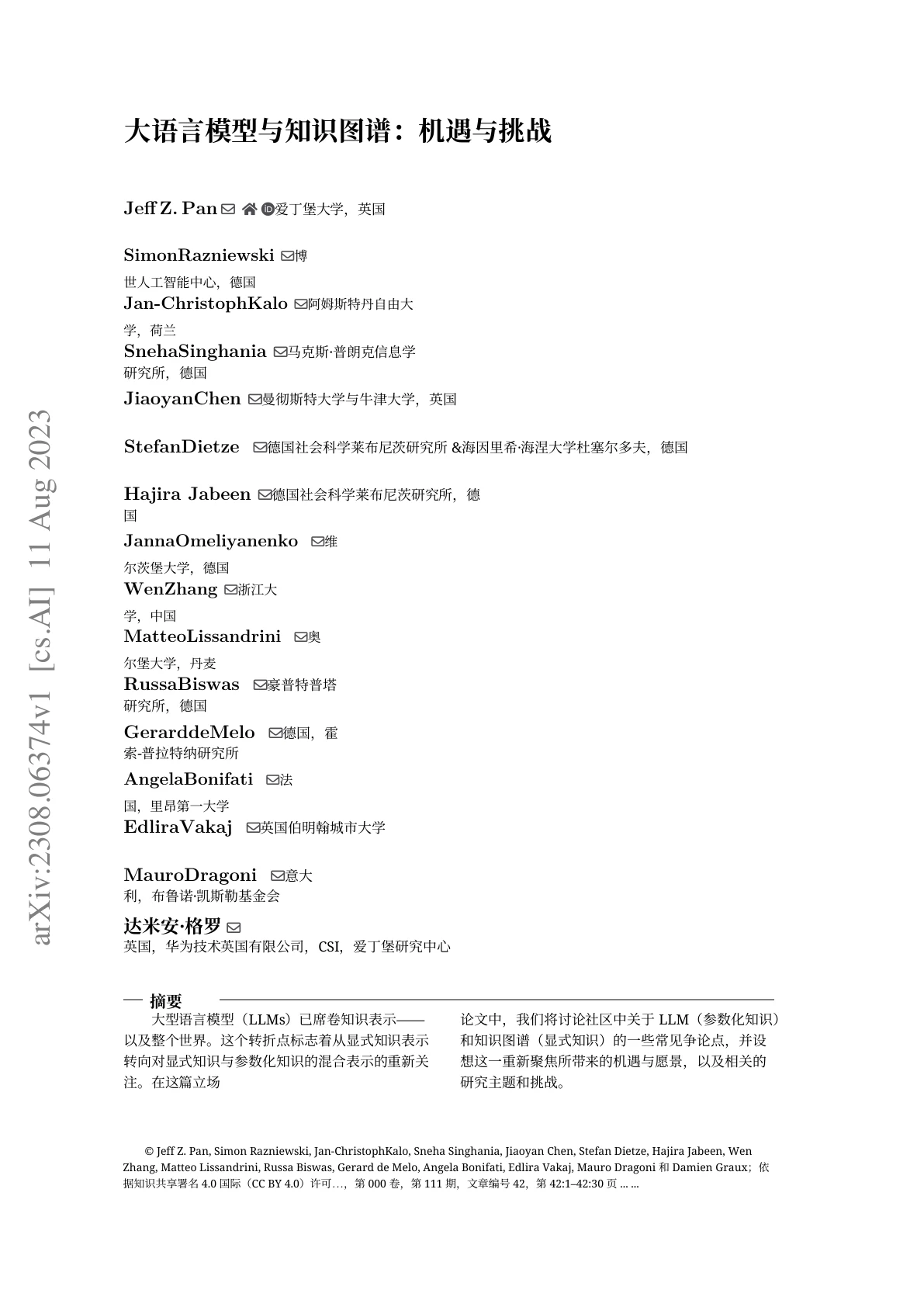
Preserved: Title hierarchy, author block, two-column abstract, identifiers, and attribution footer.
Source: Large Language Models and Knowledge Graphs: Opportunities and Challenges · CC BY 4.0; adapted to a one-page translation sample · Unofficial machine translation generated by PDFTranslate; examples reviewed August 26, 2026.
These examples use openly licensed or public-domain documents, never customer uploads. Uploaded PDFs remain private.
How does PDFTranslate preserve a PDF page?
01
Read the document
Detect the text layer, reading order, tables, figures, fonts, and scanned pages.
02
Translate in context
Carry terminology and meaning across paragraphs, captions, footnotes, and repeated phrases.
03
Rebuild and verify
Refit translated text, preserve links, and export a searchable PDF.
Which documents can PDFTranslate handle?
- 01
Research & study
Papers, citations, charts, and footnotes stay easy to follow.
- 02
Legal & finance
Contracts, reports, and disclosures keep their numbering and tables.
- 03
Operations
Manuals and product documents remain searchable and ready to share.
- 04
Global teams
Create a translated edition without waiting on desktop publishing.
How much does PDF translation cost?
Free
Translate a real sample before paying.
10 welcome credits · valid for 30 days
- Academic translation with OCR included
- PDFs up to 50 MB and 100 pages
- Results available for 7 days
Starter
For individual document work.
100 credits at each 30-day renewal
- Academic layout-preserving translation
- OCR for scanned pages is included
- PDFs up to 50 MB and 100 pages
- Results available for 7 days
Pro
For research and business teams.
500 credits at each 30-day renewal
- 50% lower included-page cost than Starter
- Academic translation with OCR included
- PDFs up to 50 MB and 100 pages
- Results available for 7 days
Page packs offer 150–1,800 credits for 12 months. Pro membership keeps the lowest included-page cost.
Your document is not our content
How does PDFTranslate handle uploaded files?
Files use encrypted transport and private object storage, are isolated by account, and are processed only to provide the requested translation. Source and result files follow the retention schedule shown in the product.
Private object storage
Short-lived download links
Automatic source and result deletion
Delete any job immediately
What should you know before uploading a PDF?
Will the translated PDF keep the same layout?
The default mode preserves page size, images, tables, links, reading order, and text positioning. Language expansion can change line wrapping, so high-stakes documents should receive a final human review.
Can it translate a scanned PDF?
Yes. OCR mode detects image-only pages, recognizes the text, and creates a searchable translated PDF. Scan quality and handwriting can affect recognition.
How are pages charged?
Each source page uses one credit, including basic OCR for scanned pages. You see the exact page estimate before starting, and failed jobs release reserved credits.
Do you use my files to train AI models?
No. Customer documents are processed only to deliver the requested translation and are deleted according to the selected retention period.
Can I cancel or delete a translation?
Queued jobs can be canceled. You can delete source and result files immediately from translation history; completed job metadata is retained only as required for billing and security.
Your next PDF already speaks another language.
Upload it, review the estimate, and keep every page recognizable.
Translate a PDF